Create a blog
Table of Contents
You can create a blog page in Portfoliobox in two ways: using a ready-made sample template or building your own from scratch. Both methods make it easy to start sharing your ideas, projects, or creative updates on your portfolio website.
Option 1: Use a Sample Blog Page
This is the fastest way to get a pre-designed Blog page with sample blog posts you can edit.
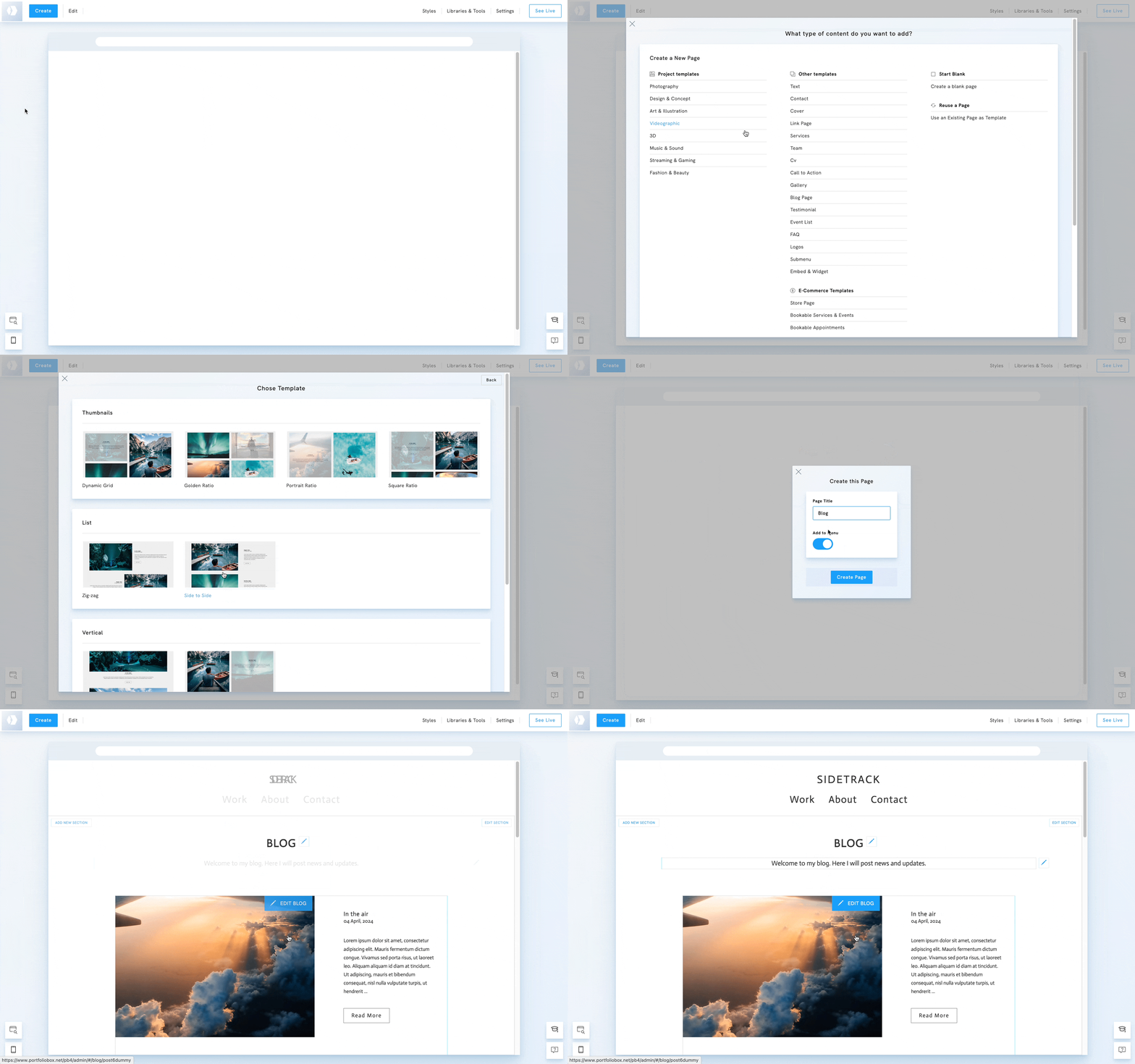
1. In the admin panel, click Create.
2. Under Start from a Sample, select Blog.
3. Enter a Page Title.
4. Click Create Page.
5. The page will include a pre-filled Blog Section and a Call to Action Section.
6. Edit the sample content by double-clicking each element.
7. Replace the Blog posts and text with your own.
8. Edit the page template.
This option is perfect if you want to launch your blog quickly with minimal setup.
Option 2: Build your own from a Blank Page
This method gives you more flexibility in choosing your e-commerce layout.
1. In the admin panel, click Create.
2. Select Blank.
3. Enter a Page Title and click Create Page.
4. Click Add Section.
5. Under Blog, select Blog page and choose a template.
6. Once your blog page is created, you can create blog posts.
This method is ideal if you want to tailor your blog layout to match your unique creative style.